Login No Captcha reCAPTCHA
View on WordPress.orgScores higher than 89% of indexed plugins
About
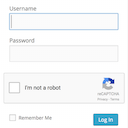
Adds a Google No Captcha ReCaptcha checkbox to your Wordpress and Woocommerce login, forgot password, and user registration pages.
Security History
What It Does
Login No Captcha reCAPTCHA adds Google's No CAPTCHA reCAPTCHA checkbox to your WordPress and WooCommerce login, forgot password, and registration forms. It intercepts automated bot submissions before they reach your authentication endpoints, reducing spam account registrations and brute-force login attempts without requiring users to solve distorted text. Setup is straightforward: install, drop in your Google reCAPTCHA site and secret keys, and the checkbox appears on the targeted forms.
Who It's For
This plugin is a good fit for site owners running WooCommerce stores, membership platforms, or any WordPress site with public-facing registration and login forms who want a low-friction layer of bot protection. It is especially useful for operators without deep server-side expertise who need a lightweight, single-purpose solution rather than a full security suite. Small-to-mid-sized sites handling account creation, password resets, or client portal access will get the most value.
Who Should Skip It
If you already use a comprehensive security plugin like Wordfence, Jetpack Security, or Really Simple Security, adding this is redundant since those tools bundle reCAPTCHA or equivalent bot defences. Sites with no public registration or login forms (brochure sites, blogs without membership) gain nothing from it.
The Bottom Line
Login No Captcha reCAPTCHA is a focused, well-maintained single-purpose tool that does one job and does it competently, earning a quality score of 82.4 out of 100. Its biggest weakness is the complete absence of support thread activity, which raises minor concerns about developer responsiveness if something breaks. For sites that want lightweight, dedicated bot protection on login and registration forms without paying for or configuring a full security suite, this is a reasonable choice.
Related Plugins
Pick this if you want a single plugin that covers reCAPTCHA plus SSL, firewall, login hardening, and broader hardening rather than a bot-only tool.
Pick this if you need a full security stack with malware scanning, a WAF, and reCAPTCHA-like login protection bundled together.
Pick this if your priority is Google services integration rather than login security, though it is not a direct substitute.
Pick this if you want login security combined with backups, downtime monitoring, and performance tools from a single, widely trusted provider.
Pick this if you need to display Google Reviews on your site rather than protect login forms, as it is not a security plugin.