Debug Bar Console
View on WordPress.orgScores higher than 46% of indexed plugins
About
Adds a PHP/SQL console to the Debug Bar. Requires the Debug Bar plugin.
What It Does
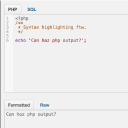
Debug Bar Console adds an interactive PHP and SQL console to the WordPress Debug Bar, letting developers execute code snippets and database queries directly from the WordPress admin. It is a companion plugin that requires the separate Debug Bar plugin to function at all. In practice, it gives developers a quick scratchpad for testing hooks, inspecting query output, and debugging without leaving the dashboard.
Who It's For
This plugin is built for WordPress developers and debugging-focused site builders who already use the Debug Bar and want a faster way to run one-off PHP or SQL queries. It suits agencies, plugin authors, and anyone maintaining staging environments where rapid iteration matters more than polished tooling. If you regularly find yourself writing throwaway scripts to test a filter or check a query, this is your use case.
Who Should Skip It
Non-technical site owners, content managers, and anyone running a production site without staging should skip this entirely, since it exposes raw PHP and SQL execution to anyone with admin access. If you only need to view error logs passively, a dedicated log viewer like Debug Log Manager is a safer and more focused option.
The Bottom Line
Debug Bar Console is a precise, narrowly useful tool that does one thing well and is actively maintained, earning a solid 75.93 quality score. Its tiny install base and zero support thread history mean you are relying on a single developer rather than a community. Install it on staging and local environments, never on a live production site open to non-developers.
Related Plugins
Pick this instead if you mainly need to read and search WordPress debug logs without the ability to execute live PHP or SQL.
Pick this if your debugging workflow centres on generating realistic fake content for testing rather than running ad hoc queries.
Pick this if you need a maintenance-mode redirect rather than a developer console.
Pick this if your real goal is debugging performance by isolating plugins per page rather than running queries directly.
Pick this if you want email alerts when your site throws fatal errors, rather than a hands-on console for manual investigation.