CoolClock
View on WordPress.orgScores higher than 39% of indexed plugins
About
Show an analog clock on your WordPress site sidebar or in post and page content.
Security History
What It Does
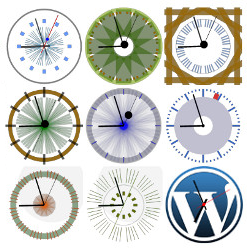
CoolClock is a lightweight WordPress plugin that injects a Javascript analog clock into your site, either as a sidebar widget or embedded directly in posts and pages via a shortcode. It also supports a logarithmic clock variant for sites that want a more decorative time display. Beyond rendering the clock, the plugin does not interact with comments, posts, or any other WordPress content.
Who It's For
This plugin is best suited for site owners who want a simple visual clock element for personal blogs, hobby sites, educational pages, or novelty designs where an analog face adds character. It works well for developers or tinkerers who just need a quick shortcode-to-clock solution without building it from scratch. It is not built for e-commerce dashboards, scheduling apps, or any workflow where time precision matters.
Who Should Skip It
Anyone who needs a functional countdown timer, world clock conversions, scheduling tools, or any time-sensitive workflow logic should skip this plugin entirely. If you simply need to display the current time in text form, a basic widget or block will do the job without any plugin at all.
The Bottom Line
CoolClock is a focused, well-rated tool that does one small job and does it competently, with a recent update and broad compatibility. The lack of any support history means you are largely on your own if something breaks, and the 2,000-install ceiling confirms it is a novelty utility rather than an essential add-on. Recommended only if a decorative analog clock specifically fits your design.
Related Plugins
Pick this if you run a WooCommerce store and need a sales or promotion countdown rather than a static decorative clock face.
Pick this if you need a functional countdown timer embedded in posts or pages, since Easy Timer is built for that purpose rather than cosmetic analog display.