Admin Slug Column
View on WordPress.orgScores higher than 70% of indexed plugins
About
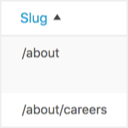
Adds a URL path column to all admin post type edit screens. Works with posts, pages, and any custom post type including WooCommerce products.
What It Does
Admin Slug Column adds a dedicated column to every post type edit screen in wp-admin that displays the URL slug (permalink path) for each item. It works out of the box with posts, pages, custom post types, and WooCommerce products, letting you quickly see and copy slugs without editing each post individually.
Who It's For
This plugin is built for site administrators and content teams managing large libraries of posts, pages, or products who need to audit, copy, or verify slugs in bulk. It is especially useful for SEO specialists, e-commerce managers, and agencies juggling multiple client sites where permalink consistency matters.
Who Should Skip It
If you run a small personal blog with a handful of posts and never think about URL structure, this plugin adds an extra column you will not use. Developers who already rely on Admin Columns or a full permalink manager for their workflow will find this redundant.
The Bottom Line
Admin Slug Column is a focused, well-maintained utility that does one thing well: showing you the slug for every post type entry right in the admin list. Its tiny install base and zero support history mean you are trusting a small developer, but the fresh code, PHP 8.0 requirement, and strong user rating make it a low-risk choice for anyone who needs slug visibility at a glance.
Related Plugins
Pick this when you want a full admin column customization toolkit that goes far beyond slugs, including custom fields, taxonomies, and sortable columns.
Choose this when you need to actually rewrite and customize permalink structures across post types, not just view them in a column.
Go with this when your main concern is controlling the permalink format for custom post types rather than displaying the existing slug in the admin.
Pick this narrow utility if your only goal is stripping the /category/ base from category archives, a job Admin Slug Column does not address.
Choose this when you specifically want to remove the custom post type slug from your front-end URLs, which is a different problem from inspecting slugs in wp-admin.